Collaborate
Share your work
Compares, API collections and automation collections can all be shared with other users in your Loupe organization, either with specific colleagues, or with everyone at once.
People you share with get a read-only view: they can open and run what you built, but they can't change your original. If they want their own editable version, they can copy it.
Share something
Click the eye icon next to the item in the sidebar list. The share settings open:
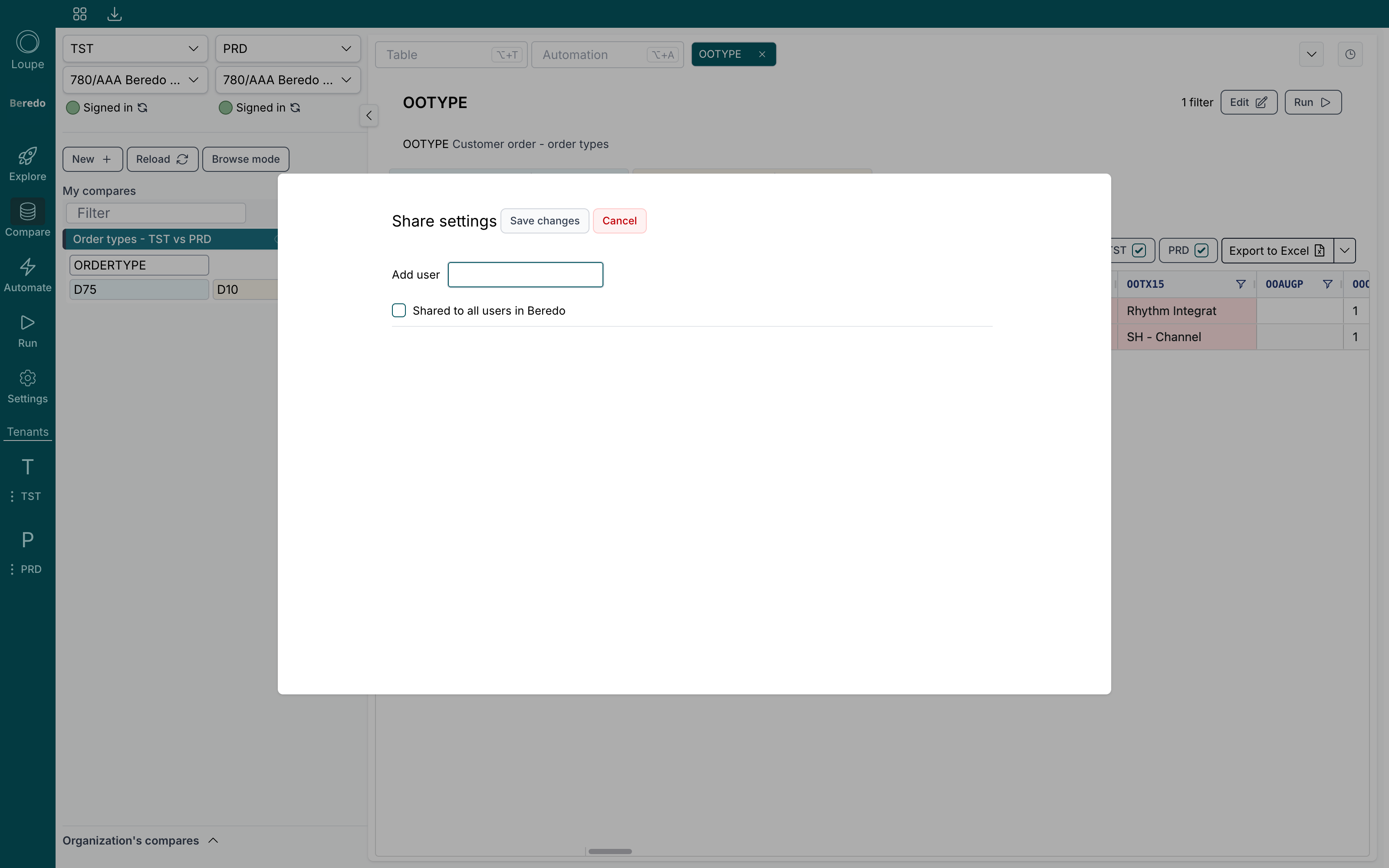
- Add user shares with specific colleagues. Start typing a name to find them. Colleagues who have been invited but haven't signed in yet can be added too.
- Shared to all users in your organization shares with everyone. When this is ticked, the individual list no longer matters.
Click Save changes.
Who can share
Sharing with the whole organization is open to every user. Sharing with individually named colleagues is managed by your organization's administrators. If you are not an administrator and per-user sharing fails to save, ask an admin to set it up.
What your colleagues see
Shared items show up for your colleagues in a separate section of the same workspace: Organization's compares in Compare, and Shared in Run and Automate. They can open and run them, and the refresh icon reloads the latest saved version.
The copy icon creates a private copy in their own list, with the same name and configuration, which they can then edit freely. Users with the Viewer role can open shared items but not copy them.